Graphic Design Layout Specifications for Printing
Graphic Design Layout Specifications for Printing
Topics
Bleed
Bleed is the amount of printed information which extends beyond the finished size of your piece.- Bleed allows us to print your piece slightly oversized and cut it down to its exact size. This gives a final seamless appearance of the image "bleeding" off the edges.
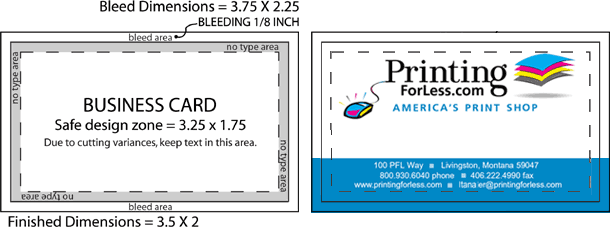
- We recommend that you build your file with bleed dimensions of an extra 1/8 inch (.125") on each side. This increases the total width and height of your document by 1/4 inch (.25"). For example, a 3.5 x 2" business card is designed as a 3.75 x 2.25" file.
- We are happy to provide templates for your use that include bleed dimensions.
- If you do not design your piece with bleeds, we are happy to add bleed free of charge!
Safe Design Zone
The safe design zone is the 1/8 inch (.125") area surrounding the inside trim edge of your piece.- Keeping your critical content-text, images, graphics-within the safe design zone ensures that nothing will be positioned too close to the edge, where it could be impacted by trimming variances of up to 1/32 inch. In the 3.5 x 2" business card example, all important content should be positioned within the interior 3.25 x 1.75".
- The safe design zone decreases to 1/16 inch (.0625") for envelopes, and increases to 3/16 inch (.1875") for catalogs with more than 36 pages.
- Borders around the outside edge should be at least 1/8 inch (.125") wide to avoid any visual variance after trimming.
Panel Dimensions
The best way to understand panel dimensions is to make a quick mock-up of your folded piece. The panel dimensions are listed from narrowest to widest. Once you have a folded mock-up, write the dimensions on the appropriate panels, both front and back. Then translate your page and panel information into your design layout.- Dimensions are provided at bleed size/at trim size
- We are happy to provide templates for your use that include fold line indicators.


Comments
Post a Comment